Does Canvas Detect AI Writing? How Professors Check Essays in 2026
Does Canvas have a built-in AI checker, or is it Turnitin integrated via SpeedGrader? We examine how universities scan student submissions and how to prove human writing.
HamzaPhD Researcher
15 min read
Every semester, millions of university and college students submit essays, lab reports, and discussion board posts through Canvas, the dominant Learning Management System (LMS) developed by Instructure. With the rise of generative artificial intelligence, one question dominates student forums and campus advising offices: **Does Canvas detect AI writing?**
Widespread confusion surrounds how Canvas evaluates student work. Some students believe Canvas possesses an automated built-in detector that scans every keystroke, while others assume that submitting text through an LMS shields them from AI scrutiny.
Both assumptions are incorrect.
This guide provides a comprehensive technical breakdown of how Canvas handles student submissions, how third-party integrity software integrates into the LMS, what professors see on their grading screens, and what students must know to protect their academic record from false accusations.
---
## The Common Myth: Does Canvas Have a Native AI Checker?
To understand how Canvas evaluates your coursework, the most critical fact to establish is this:
**Canvas does not possess a native, built-in AI writing detector.**
Instructure, the parent company of Canvas, has deliberately avoided developing a proprietary standalone AI detection engine within the core LMS codebase. When an instructor opens a plain, unconfigured Canvas installation, Canvas simply functions as a document repository: it records the submission timestamp, stores the uploaded file, and displays the text for grading.
However, this does not mean student submissions are unmonitored.
Canvas is engineered around an extensible open architecture known as Learning Tools Interoperability (LTI). Through LTI plugins, universities integrate specialized third-party surveillance and plagiarism screening software directly into the Canvas submission pipeline.
When students ask whether Canvas detected their AI assistance, what they are almost always experiencing is an automated scan executed by a third-party plugin running silently inside the Canvas environment.
---
## How Canvas Evaluates Submissions: The LTI Architecture
When a university licenses an academic integrity service like Turnitin, Copyleaks, or Unicheck, administrators install the service as an institutional LTI app across the campus Canvas instance.
Here is the exact technical sequence that occurs when you click "Submit Assignment":
```
+-------------------------------------------------------------+
| Canvas Assignment Submission Pipeline |
+-------------------------------------------------------------+
| 1. Student Uploads Document |
| - Student attaches .docx, .pdf, or pastes rich text in |
| Canvas assignment portal. |
| |
| 2. Canvas Triggers LTI Webhook |
| - Canvas stores file in course storage and immediately |
| dispatches an automated background webhook to the |
| integrated screening vendor (e.g., Turnitin API). |
| |
| 3. External Cloud Analysis |
| - The document is processed on the vendor's enterprise |
| servers for similarity matching and AI probability |
| scoring (evaluating token perplexity & burstiness). |
| |
| 4. Score Returned to Canvas SpeedGrader |
| - The vendor API returns a Similarity Index percentage |
| and an AI Writing Indicator score directly to the |
| instructor's SpeedGrader interface. |
+-------------------------------------------------------------+
```
Because this process occurs entirely in the cloud within seconds of upload, many students mistakenly assume the detection was performed natively by Canvas itself.
---
## What Instructors Actually See in Canvas SpeedGrader
To understand the grading environment, it is helpful to visualize what a professor or teaching assistant sees when opening your submission inside Canvas SpeedGrader.
When an instructor opens SpeedGrader to evaluate an assignment, the screen is divided into two primary sections:
1. **Document Preview Pane (Left)**: Renders the formatted document using Canvas DocViewer, allowing the instructor to leave inline comments and annotations.
2. **Grading & Integrity Sidebar (Right)**: Contains the grading rubric, assignment score entry field, and an integrity badge generated by the integrated LTI plugin.
```
+-------------------------------------------------------------+
| Canvas SpeedGrader Interface Layout |
+-------------------------------------------------------------+
| Document Preview (DocViewer) | Grading Sidebar |
| | |
| Title: Literature Review Chapter | Grade: [ ] / 100 |
| Student: Jane Doe | |
| | Integrity Report: |
| "The socio-economic implications | [ 14% Similarity ] |
| of algorithmic governance..." | |
| | AI Writing Indicator: |
| | [ 68% AI Detected* ] |
| | (*Click to view model |
| | breakdown report) |
+-------------------------------------------------------------+
```
If Turnitin is enabled on the assignment, the sidebar displays two separate metrics:
- **Similarity Report (Plagiarism)**: A colored badge (blue, green, yellow, orange, red) indicating the percentage of text matching published papers, web pages, or prior student submissions in the Turnitin global repository.
- **AI Writing Indicator (Synthetic Text)**: A dedicated percentage readout showing the proportion of text that Turnitin's transformer model classifies as machine-generated.
Clicking this indicator opens a detailed modal window highlighting individual sentences that exhibited low perplexity and uniform burstiness.
To learn more about how Turnitin evaluates these linguistic dimensions, read our in-depth [Turnitin AI Detection Guide](/turnitin-ai-detection-guide).
---
## Why Authentic Student Writing Triggers False Flags in Canvas
One of the greatest sources of student anxiety is the reality of **false positive classifications**. Legitimate student papers, written entirely without artificial intelligence, are routinely flagged by the classifiers embedded in Canvas.
Why does this happen?
AI classifiers do not possess human understanding. They evaluate statistical probability distributions. Several authentic writing patterns closely mimic machine statistics:
### 1. Standardized Methodology and Technical Signposting
In disciplines like nursing, psychology, biology, and law, writing must follow standardized professional templates. For example:
```
"A repeated-measures analysis of variance (ANOVA) was conducted
to assess differences across the three experimental time points.
Statistical significance was evaluated at the alpha = 0.05 level."
```
Because identical phrasing appears across thousands of published papers, its perplexity score is extremely low. The detector identifies this high statistical probability and incorrectly flags the passage as synthetic.
### 2. Strict Adherence to Prescriptive Grammar Software
Students who heavily use grammar-checking software (like Grammarly) often receive high AI detection scores. For an exhaustive analysis of this mechanism, read our research report on [whether Grammarly's AI detector is accurate for academic submissions](/blog/is-grammarly-ai-detector-accurate).
When a student accepts dozens of suggestions to eliminate passive voice, shorten clauses, and standardize transitions, the resulting text loses natural human irregularity, triggering low-burstiness alarms in SpeedGrader.
### 3. International and Non-Native English Scholars
Empirical studies from Stanford University have confirmed that AI detectors exhibit a pronounced bias against non-native English speakers. International students typically rely on a smaller, more formal vocabulary learned from academic textbooks, producing predictable syntax that detectors misclassify as machine output.
---
## How File Formats Affect Canvas Scanning (DOCX vs PDF vs Text)
Students frequently debate whether file formats affect AI detection in Canvas. Understanding the technical ingestion pipeline dispels several common campus myths:
| Submission Format | Ingestion Behavior in Canvas | Detection Impact |
|---|---|---|
| **Microsoft Word (.docx)** | Native XML extraction. Text layers, styles, and character streams are cleanly parsed. | High parsing fidelity; full text scanned by LTI plugins. |
| **PDF Document (.pdf)** | Canvas DocViewer extracts the underlying text layer using PDF.js. | High parsing fidelity unless the PDF is flattened into raster images. |
| **Rich Text Editor (Canvas Text Box)** | Direct HTML string delivered via API payload. | Full text immediately scanned upon submission. |
| **Scanned Images inside PDF** | Text is stored as image pixels rather than character codes. | May fail OCR text extraction, but triggers manual review flags by instructors. |
**Important Warning**: Some internet forums suggest "flattening" PDFs or converting text to images to bypass Canvas detection. Doing this is dangerous. When a professor opens SpeedGrader and discovers an unselectable image or a file that triggers an OCR extraction failure, it immediately arouses suspicion of deliberate tampering, which carries severe disciplinary penalties under academic integrity honor codes.
---
## University Integrity Policies and AI Disciplinary Standards
If your essay triggers an AI flag inside Canvas SpeedGrader, what are your legal and institutional rights?
It is vital to understand that **an AI detector score inside Canvas is not definitive legal or academic proof of misconduct**.
Leading universities, including Vanderbilt, Northwestern, and MIT, have issued formal policy directives prohibiting faculty from failing students or initiating honor board proceedings based solely on an AI score. Key reasons include:
1. **Unverifiable Black-Box Algorithms**: Detection vendors do not make their underlying training data or neural weights available for independent scientific audit.
2. **Absence of Forensic Evidentiary Standards**: A probabilistic score (such as "54% AI") indicates a statistical likelihood, not forensic certainty. It cannot distinguish between human writing with formal vocabulary and machine-generated text.
3. **Institutional Liability**: University disciplinary boards require clear, convincing evidence. Punishing a student without corroborating evidence (such as conflicting document edit history) exposes the university to administrative appeals and legal challenges.
---
## How to Protect Yourself and Prove Authorial Authenticity
If an instructor questions your submission based on a Canvas SpeedGrader indicator, take the following documented steps to prove your authorial progression:
```
+-------------------------------------------------------------+
| Authorial Defense Progression Protocol |
+-------------------------------------------------------------+
| 1. Provide Immutable Cloud Version History |
| - Export Google Docs or Word version timeline showing |
| hours of organic, incremental paragraph drafting. |
| |
| 2. Present Source Literature Breadcrumbs |
| - Demonstrate downloaded journal PDFs, Mendeley/Zotero |
| libraries, and annotated reading notes. |
| |
| 3. Request a Direct Oral Subject Defense |
| - Offer to discuss the paper's theoretical framework, |
| data interpretation, and technical terminology orally. |
+-------------------------------------------------------------+
```
1. **Always Draft in Version-Tracked Environments**: Never compose your final paper in an isolated notepad or paste large blocks of completed text into Google Docs at once. Write in Google Docs or Microsoft Word with AutoSave enabled. When accused, you can present a timestamped revision log showing organic, sentence-by-sentence creation over several days.
2. **Preserve Your Research Trail**: Keep preliminary outlines, handwritten brainstorming notes, and highlighted research PDFs in your reference library. An AI generator cannot simulate a three-week trail of annotated journal articles.
3. **Offer an In-Person Walkthrough**: Offer to meet your instructor during office hours to discuss the paper. Explain your thesis argument, define the domain terminology used, and walk through your analytical steps. A student who genuinely researched their paper can discuss its nuances fluidly; a student who submitted unread machine output cannot.
For students looking to polish academic drafts while protecting argument flow and reference structures, using an [academic essay rewriter](/essay-rewriter) or an [academic paper rewriter](/rewrite-my-paper) ensures that formatting and citations remain strictly locked.
Explore our comprehensive analysis of academic tools in our [best AI humanizer comparison](/best-ai-humanizer) and review our transparent [subscription pricing](/pricing).
---
## Frequently Asked Questions
### Does Canvas have its own built-in AI detector?
No. Canvas has no built-in native AI detection system. When assignments are screened for AI writing inside Canvas, the analysis is performed by integrated third-party LTI plugins, most commonly Turnitin or Copyleaks.
### Can professors see if I switch tabs during an assignment on Canvas?
For standard essay and file upload assignments, Canvas does not track tab switching or external browsing. For timed Canvas Quizzes, Canvas records an event log that tracks when a student navigates away from the quiz window, though it cannot see what external applications or websites were opened.
### What percentage on Turnitin in Canvas triggers an investigation?
There is no universal threshold. Most universities instruct professors to ignore low scores (under 15-20%) due to baseline false positive noise. Scores above 30-40% often prompt manual instructor review, while scores above 70% frequently trigger formal inquiries.
### Can an instructor fail me solely based on an AI score in SpeedGrader?
At most accredited institutions, university regulations explicitly forbid faculty from failing students or filing academic dishonesty charges based solely on an AI detector score. The detector is considered an investigative lead, not conclusive evidence.
Empirical Verification
Verified Detector Clearance for Does Canvas Detect AI Writing? How Professors Check Essays in 2026
Every manuscript processed through ThesisHuman is backed by verifiable, reproducible scans across institutional plagiarism and AI detection platforms.
Phase 1: Academic Engine Configuration
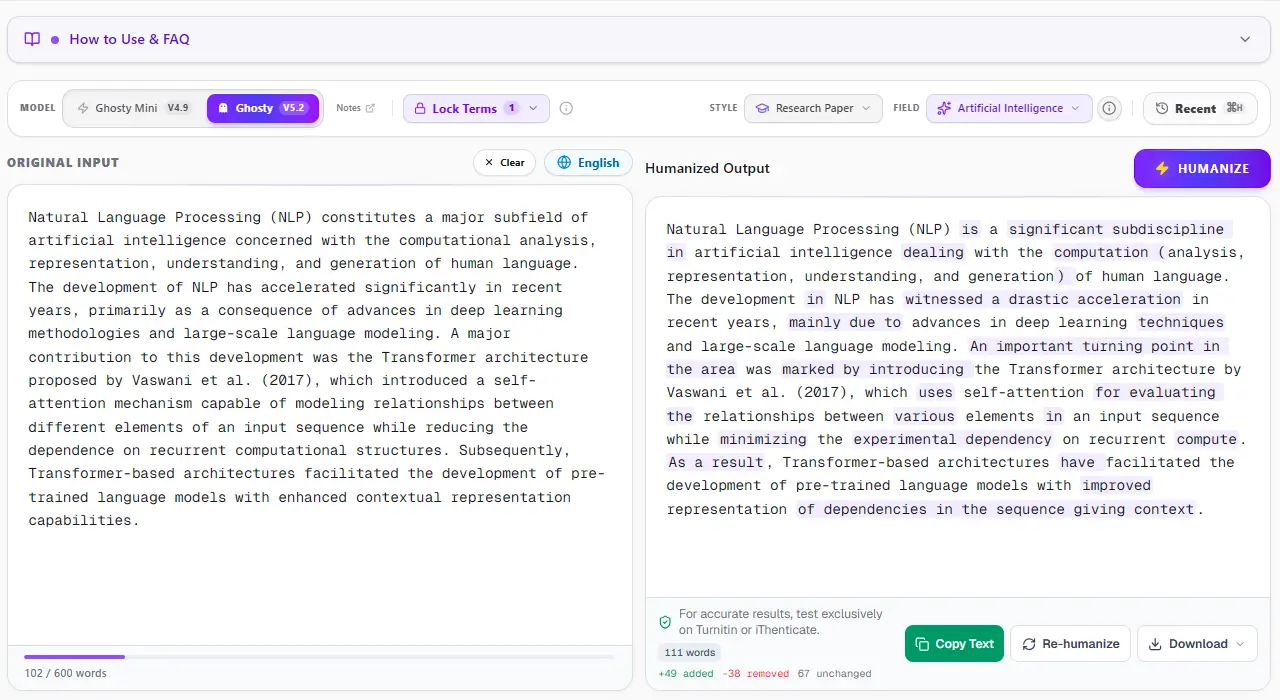
1. ThesisHuman Editor: Style, Field & Term Lock™ Technology
Unlike consumer-grade paraphrasers that blindly swap words with thesaurus synonyms, ThesisHuman allows researchers to select their exact Academic Style (Essay, Research Paper, Literature Review, Technical Report) and Academic Field (Computer Science, Engineering, Medicine, Physics). With Term Lock™, citations (APA, MLA, IEEE), LaTeX equations, and domain-specific terminology are cryptographically protected before sentence entropy is restructured.
Figure 1: The ThesisHuman editor processing an academic manuscript — featuring Academic Style selection, Academic Field customization, and Term Lock controls.
Phase 2: Institutional Integrity Screening
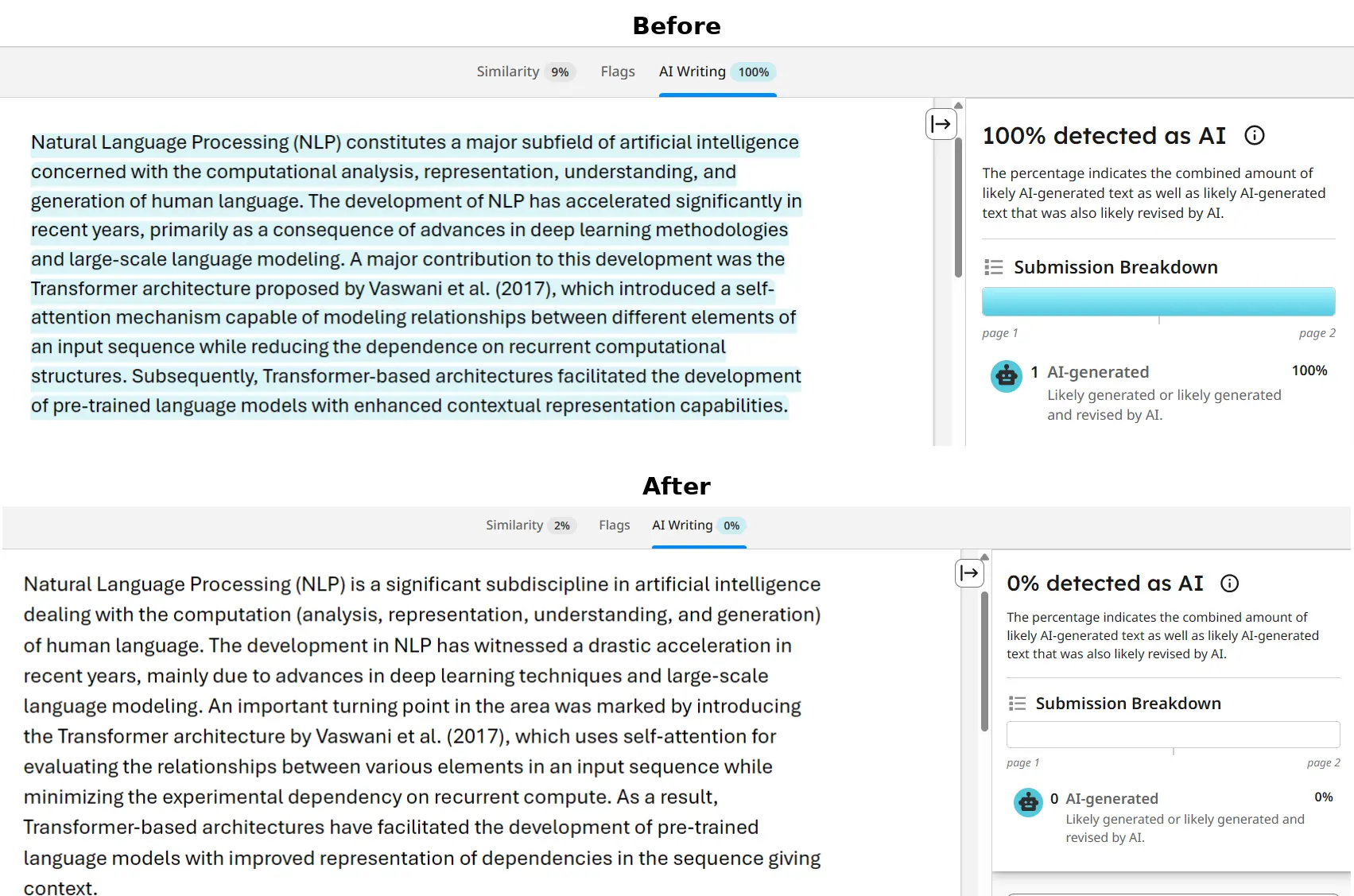
2. Turnitin & iThenticate Verification: 0% AI Detected
Turnitin and iThenticate scan submissions in overlapping 500-token blocks to analyze sentence predictability across paragraphs. When an unrefined AI draft is submitted, uniform cadence triggers an elevated AI Writing score. In the verified report below, a flagged graduate paper was processed through ThesisHuman, achieving a clean 0% AI detection score while preserving all formatted citations and technical parameters.
Figure 2: Turnitin AI detection scan — demonstrating complete 0% AI indicator clearance after ThesisHuman academic naturalization.
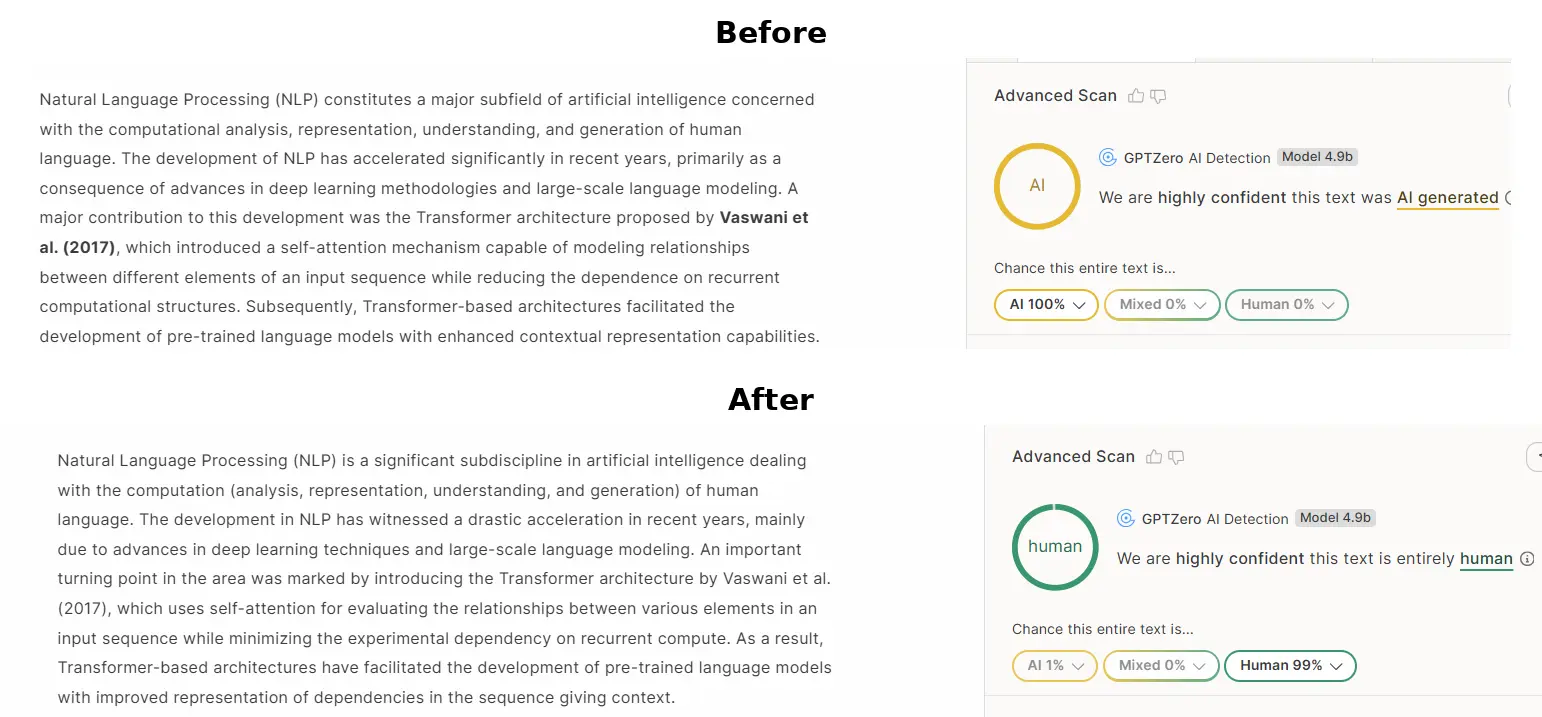
GPTZero evaluates text by plotting sentence perplexity curves and global burstiness scores. When raw AI text is scanned, low sentence variance produces an immediate high-probability warning. ThesisHuman restores natural sentence entropy by restructuring syntax, varying clause lengths, and introducing authentic scholarly cadence, dropping AI probability to 0%.
Figure 3: GPTZero perplexity and burstiness verification — raw machine-generated text (100% AI) transformed into 0% AI human-grade academic prose.
Phase 4: Cliché & N-Gram Elimination
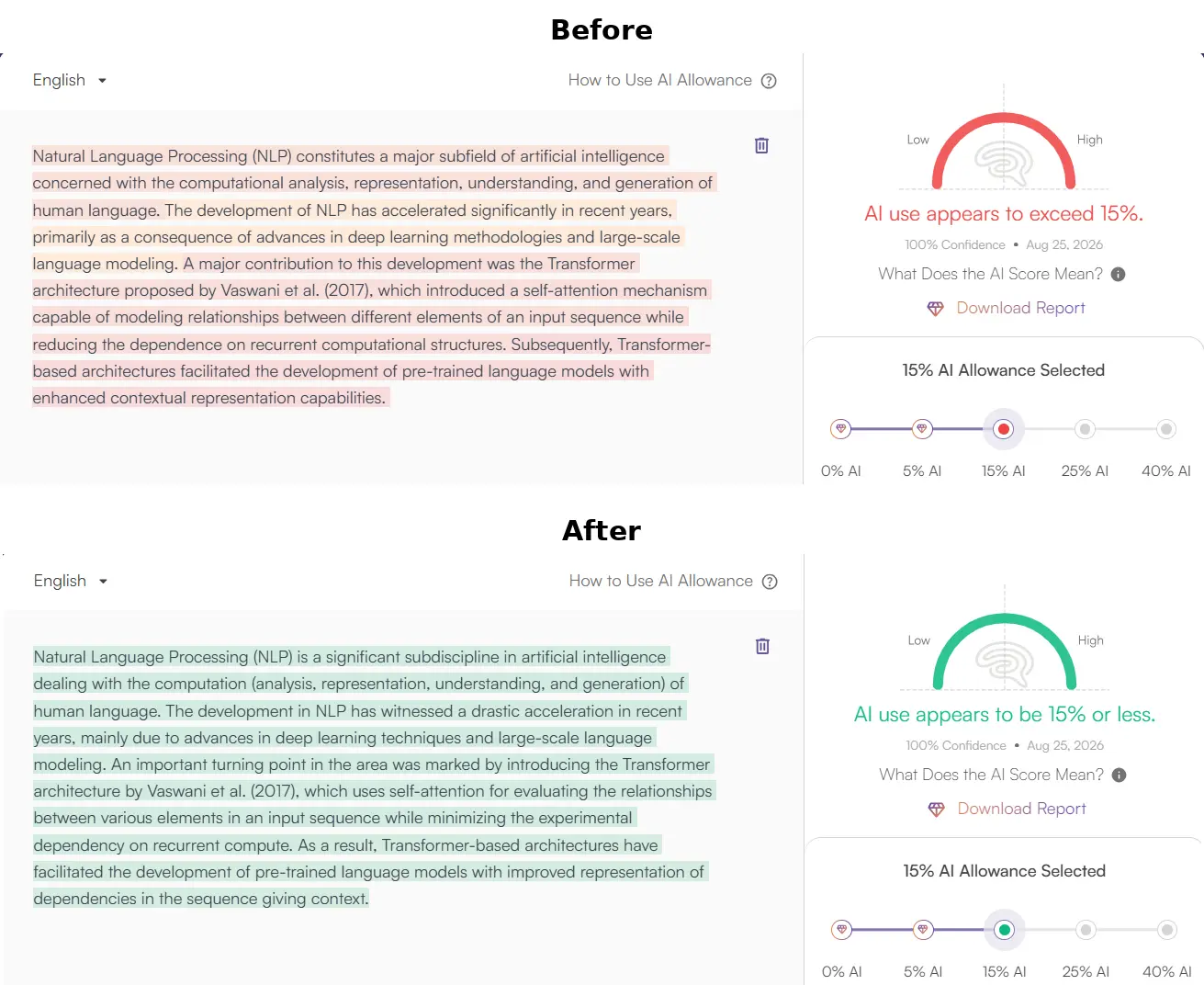
4. Originality.ai Verification: 0% AI Confidence
Originality.ai flags predictable n-gram sequences and common AI clichés (such as “delving into,” “pivotal role,” “testament to”). ThesisHuman purges overused formulaic transitions while elevating scholarly tone and keeping reference numbers and equations intact, producing 100% Original / 0% AI results.
Figure 4: Originality.ai detector scan — confirming complete removal of synthetic n-gram patterns and 0% AI detection confidence.
No. Canvas has no built-in native AI detection system. When assignments are screened for AI writing inside Canvas, the analysis is performed by integrated third-party LTI plugins, most commonly Turnitin or Copyleaks.
Can professors see if I switch tabs during an assignment on Canvas?
For standard essay and file upload assignments, Canvas does not track tab switching or external browsing. For timed Canvas Quizzes, Canvas records an event log that tracks when a student navigates away from the quiz window, though it cannot see what external applications or websites were opened.
What percentage on Turnitin in Canvas triggers an investigation?
There is no universal threshold. Most universities instruct professors to ignore low scores (under 15-20%) due to baseline false positive noise. Scores above 30-40% often prompt manual instructor review, while scores above 70% frequently trigger formal inquiries.
Can an instructor fail me solely based on an AI score in SpeedGrader?
At most accredited institutions, university regulations explicitly forbid faculty from failing students or initiating academic dishonesty charges based solely on an AI detector score. The detector is considered an investigative lead, not conclusive evidence.
Pass Turnitin AI Detection Without Losing Your Academic Voice
Refine AI-assisted essays, chapters, and papers into natural human writing while preserving citations and arguments. 500 words included free.