How to Check for AI on Google Docs: Built-in Features, Extensions, and Audit Trails
Learn whether Google Docs has a native AI detector, how instructors inspect version histories for paste events, and how to verify academic drafts before submission.
As university honor boards, secondary schools, and academic journals tighten their scrutiny of generative artificial intelligence, millions of students and researchers write inside Google Docs every day. When an assignment or thesis chapter is complete, writers naturally ask a critical question: how do you check for AI on Google Docs, and can your instructor tell whether artificial intelligence helped draft your manuscript?
Confusion surrounding this topic is widespread. Many students believe Google Docs contains a hidden AI scanner that reports text directly to institutional administrators. Others assume that pasting large language model output into Google Docs strips away all synthetic footprints. Both assumptions are incorrect. Google Docs operates under a completely different technical model than automated scanners like Turnitin, GPTZero, or Copyleaks.
This comprehensive guide clarifies the exact capabilities of Google Docs in 2026. We explain what Google Docs can and cannot detect natively, how professors and university integrity panels forensic audit document version histories, which third-party extensions provide genuine verification, and how to build an unassailable record of authentic human composition.
Does Google Docs Have a Native AI Detector?
The short answer is no. Google Docs does not possess a native, built-in artificial intelligence detection scanner. When you compose, paste, or format text in Google Docs, the platform does not calculate perplexity scores, burstiness metrics, or probability distributions to estimate whether the prose originated from a large language model.
Google has integrated generative artificial intelligence into Google Workspace through its Gemini ecosystem. These features provide text generation, stylistic rewriting suggestions, and email summarization. However, Workspace Gemini does not act as an integrity filter. It does not scan student submissions for plagiarism, nor does it assign machine-authorship percentages to uploaded content.
Why does Google omit native AI detection? The primary reason lies in mathematical reliability. Detection models operate as probabilistic classifiers rather than factual verifiers. High error rates and false-positive flags across non-native English speakers make embedding an automated disciplinary scanner directly into word processing software a major institutional liability. Google provides collaborative editing infrastructure, leaving academic integrity enforcement to specialized third-party software.
How Instructors and Honor Boards Inspect Google Docs
Even though Google Docs lacks a built-in detector, instructors, teaching assistants, and university honor committees routinely use Google Docs as primary forensic evidence during academic integrity inquiries. Rather than relying on automated statistical scores, educators inspect the document's underlying telemetry and revision logs.
Every action performed in a Google Doc is tracked by Google's cloud infrastructure. This metadata includes timestamped edits, active collaborator sessions, cursor positions, and character additions. When an instructor suspects that a submission was generated by ChatGPT or Claude, they do not need an external scanner; they examine the document's writing lifecycle.
Detecting Monolithic Paste Events vs Organic Typing
Authentic human writing leaves a messy, irregular digital footprint. Over an authentic three-hour drafting session, a writer types phrases, pauses to review source material, deletes awkward sentences, reorganizes paragraphs, and corrects typographical slips. This organic drafting cadence produces hundreds of granular version history increments.
In contrast, when a user prompts a generative model and copies the entire output into Google Docs, the digital signature is starkly different:
- Instantaneous Word Spikes: Three thousand words appear in the document within a ten-second revision window without preceding character-level typing activity.
- Zero Typographical Corrections: The pasted text contains zero backspaces, zero immediate self-corrections, and zero iterative sentence rephrasings.
- Formatting Artifacts: Copied prose frequently carries hidden HTML clipboard tags, such as subtle grey background highlights, non-standard font spans, or unusual line break delimiters.
- Linear Progression: The entire document advances in uniform, monolithic chunks corresponding to successive chat interface generations.
When a university panel compares an organic, multi-day version history against a document created via two paste operations, the timeline alone provides compelling circumstantial proof of external composition. For deeper context on how learning management systems interface with these logs, see our guide on how Canvas detects AI writing through SpeedGrader and LMS logs.
Google Classroom and Institutional Workspace Audit Logs
In academic environments that utilize Google Classroom or Google Workspace for Education, document inspection is even more streamlined for instructors. When an assignment is submitted through Google Classroom, several institutional mechanisms activate automatically:
- Automated Ownership Transfer: Upon clicking "Turn In," document edit permissions temporarily transfer from the student to the course instructor. The instructor immediately gains uninhibited administrative access to the complete, unedited revision tree.
- Embedded Grading Viewer: The Google Classroom grading dashboard displays document history side-by-side with assignment rubrics. Instructors can scrub through the creation timeline with a single click, viewing every paragraph creation timestamp without requesting additional permissions.
- Cross-Account Paste Discrepancies: If a student drafts an assignment on a personal Gmail account and subsequently shares or pastes it into their official institutional account, the revision log records a single massive external insertion. Educators frequently flag this pattern, requiring students to demonstrate the drafting provenance on the original account.
- Domain Administrator Audit Logs: Workspace administrators possess access to high-level tenant audit logs, recording file creation times, external export activities, and collaborator email addresses. These records make it straightforward for academic integrity panels to establish whether external parties collaborated on a submission.
Third-Party Google Docs Extensions and Add-Ons
Users seeking to check text directly inside Google Docs must rely on third-party workspace add-ons or Chrome browser extensions. Several options exist, each serving distinct purposes:
1. Revision Playback Utilities (Draftback)
Draftback is a popular Chrome extension that accesses the raw revision history API of any Google Doc where you have edit access. It reconstructs the entire drafting process into a playable keystroke video. It displays typing speed graphs, pause durations, and revision intervals. For students facing false-positive accusations from tools like Turnitin, a Draftback recording provides irrefutable evidence that every sentence was typed manually over several hours.
2. Detector Add-Ons (GPTZero and Copyleaks Workspace Add-Ons)
Vendors such as GPTZero and Copyleaks publish official Google Docs add-ons available through the Google Workspace Marketplace. Once installed, these tools allow writers to highlight a paragraph and request an immediate AI probability scan within the side panel. While convenient, keep two critical considerations in mind:
- Probabilistic Nature: A zero percent score in a workspace add-on does not guarantee a clean report on Turnitin or iThenticate, as each vendor employs proprietary classifiers and differing sensitivity thresholds.
- Data Privacy: Workspace add-ons transmit your highlighted text across external servers. If you are handling proprietary scientific data, medical patient records, or unpublished patent disclosures, verify that the extension operates under zero-retention privacy standards.
Step-by-Step Forensic Authorship Defense Protocol
If an instructor or integrity officer flags your paper using Turnitin or an LMS scanner, your Google Docs version history is your most powerful defense asset. Follow this systematic protocol to extract and present your drafting record:
- Access Version History: In Google Docs, navigate to File > Version history > See version history (or press Ctrl+Alt+Shift+H on Windows, Cmd+Option+Shift+H on Mac).
- Expand Detailed Revisions: In the right-hand panel, ensure the toggle labeled "Show changes" is checked. Click the chevron icons next to major dates to expand granular intermediate timestamps.
- Document Drafting Chronology: Take high-resolution screenshots of successive editing sessions. Capture timestamps proving that your introduction was drafted on Tuesday, your literature review was reorganized on Wednesday, and your bibliography was compiled on Thursday.
- Provide Read-Only Document Access: Generate a shareable link with "Viewer" permissions and provide it to your department chair or academic integrity committee. This allows reviewers to independently verify the digital revision tree within Google's cloud servers.
- Corroborate with Secondary Evidence: Pair your revision screenshots with your initial handwritten scratchpads, library database search histories, and highlighted source PDFs. For specialized defense tactics against false Turnitin flags, review our analysis on why AI detectors flag human writing, our guide on whether Canvas LMS detects AI writing, and our evaluation of Grammarly AI detector accuracy.
Pre-Submission Screening and Academic Naturalization
When researchers use artificial intelligence as an assistive tool for grammar refinement, idea organization, or outlining, pasting generated text directly into a document creates both statistical and behavioral vulnerabilities. Raw machine text exhibits flat perplexity and repetitive sentence lengths that automated institutional filters quickly flag.
To ensure your prose reads with authentic academic voice while preserving technical rigor, adopt a disciplined pre-submission workflow:
- Draft Incrementally in Cloud Editors: Never compose major research papers in disconnected offline notes and paste completed drafts in a single action. Write directly in Google Docs or Word for Web so that every sentence generates a timestamped character record.
- Lock Disciplinary Citations and Terminology: Generic paraphrasing tools corrupt APA, MLA, and Chicago citation syntax. Use specialized academic platforms like ThesisHuman's academic editor, which freezes bracketed citations, mathematical equations, and domain terminology during naturalization.
- Calibrate Scholarly Cadence: Eliminate robotic transition crutches such as "furthermore," "moreover," and "it is crucial to note." Restructure compound clauses so that sentence lengths vary naturally between concise declarative claims and complex analytical qualifications.
- Review Active Options: Explore dedicated tools designed for specific university document formats, such as our academic essay rewriter, term paper rewriting engine, and scholarly tone calibration tool. You can get started immediately with free ThesisHuman registration to test your drafts.
Frequently Asked Questions
Below are direct answers to common questions regarding Google Docs AI checking and academic integrity workflows.
Verified Detector Clearance for How to Check for AI on Google Docs: Built-in Features, Extensions, and Audit Trails
Every manuscript processed through ThesisHuman is backed by verifiable, reproducible scans across institutional plagiarism and AI detection platforms.
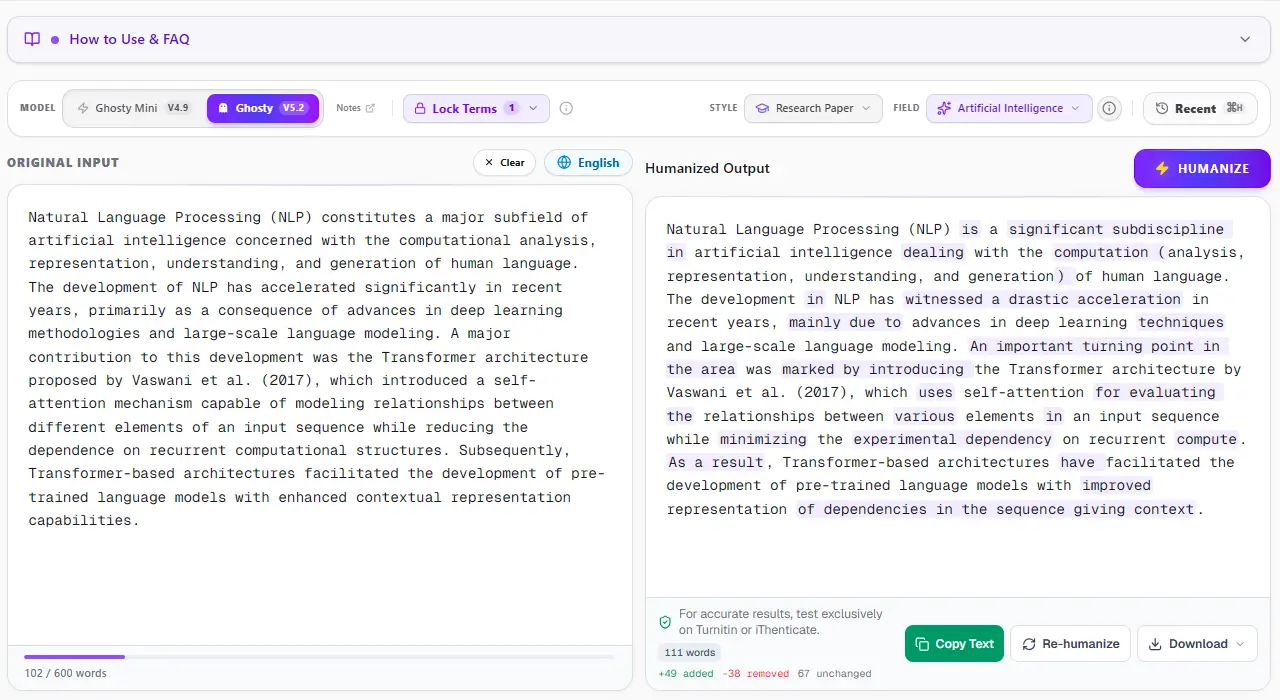
1. ThesisHuman Editor: Style, Field & Term Lock™ Technology
Unlike consumer-grade paraphrasers that blindly swap words with thesaurus synonyms, ThesisHuman allows researchers to select their exact Academic Style (Essay, Research Paper, Literature Review, Technical Report) and Academic Field (Computer Science, Engineering, Medicine, Physics). With Term Lock™, citations (APA, MLA, IEEE), LaTeX equations, and domain-specific terminology are cryptographically protected before sentence entropy is restructured.
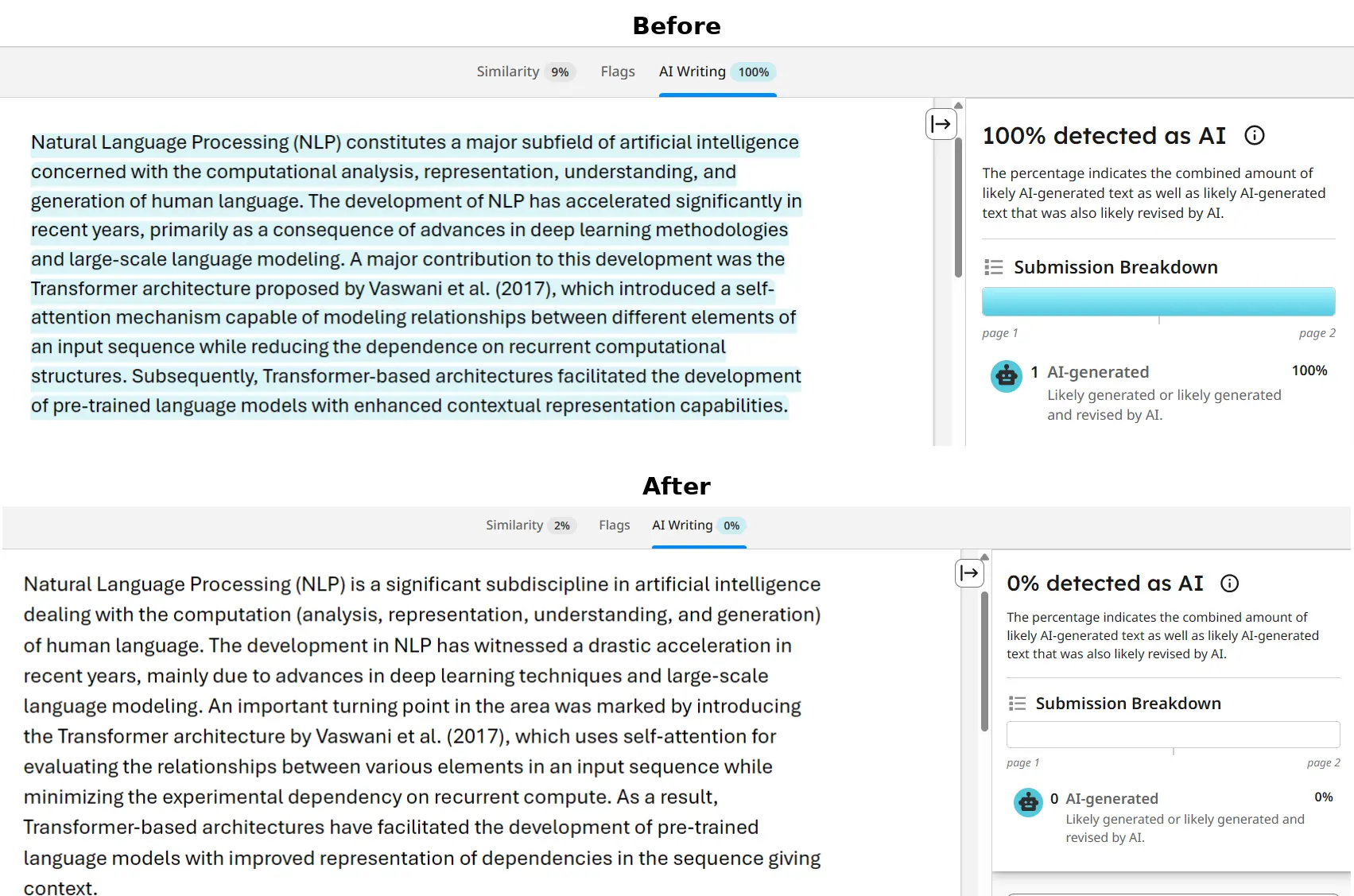
2. Turnitin & iThenticate Verification: 0% AI Detected
Turnitin and iThenticate scan submissions in overlapping 500-token blocks to analyze sentence predictability across paragraphs. When an unrefined AI draft is submitted, uniform cadence triggers an elevated AI Writing score. In the verified report below, a flagged graduate paper was processed through ThesisHuman, achieving a clean 0% AI detection score while preserving all formatted citations and technical parameters.
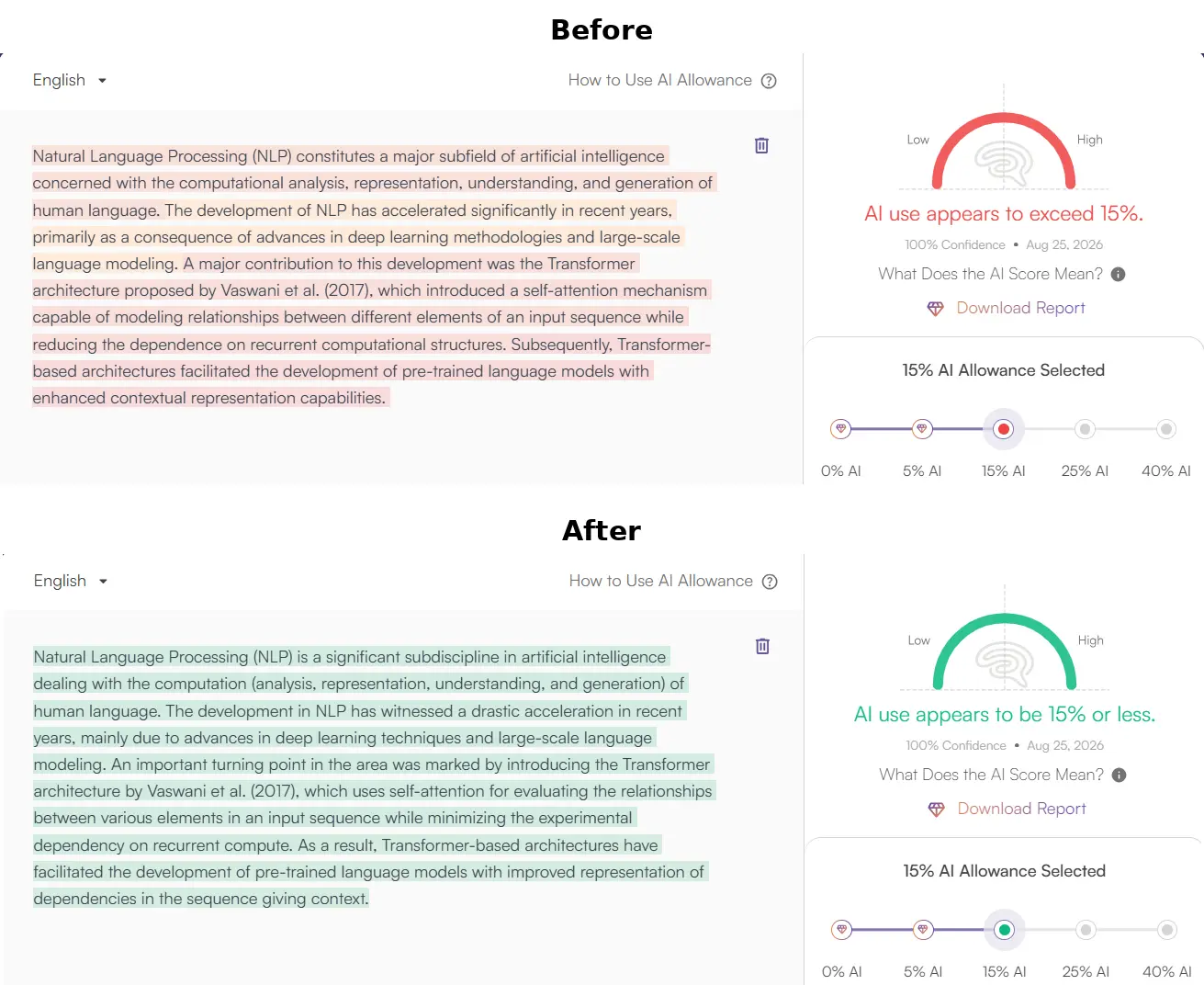
3. GPTZero Verification: Passing Perplexity & Burstiness Checks
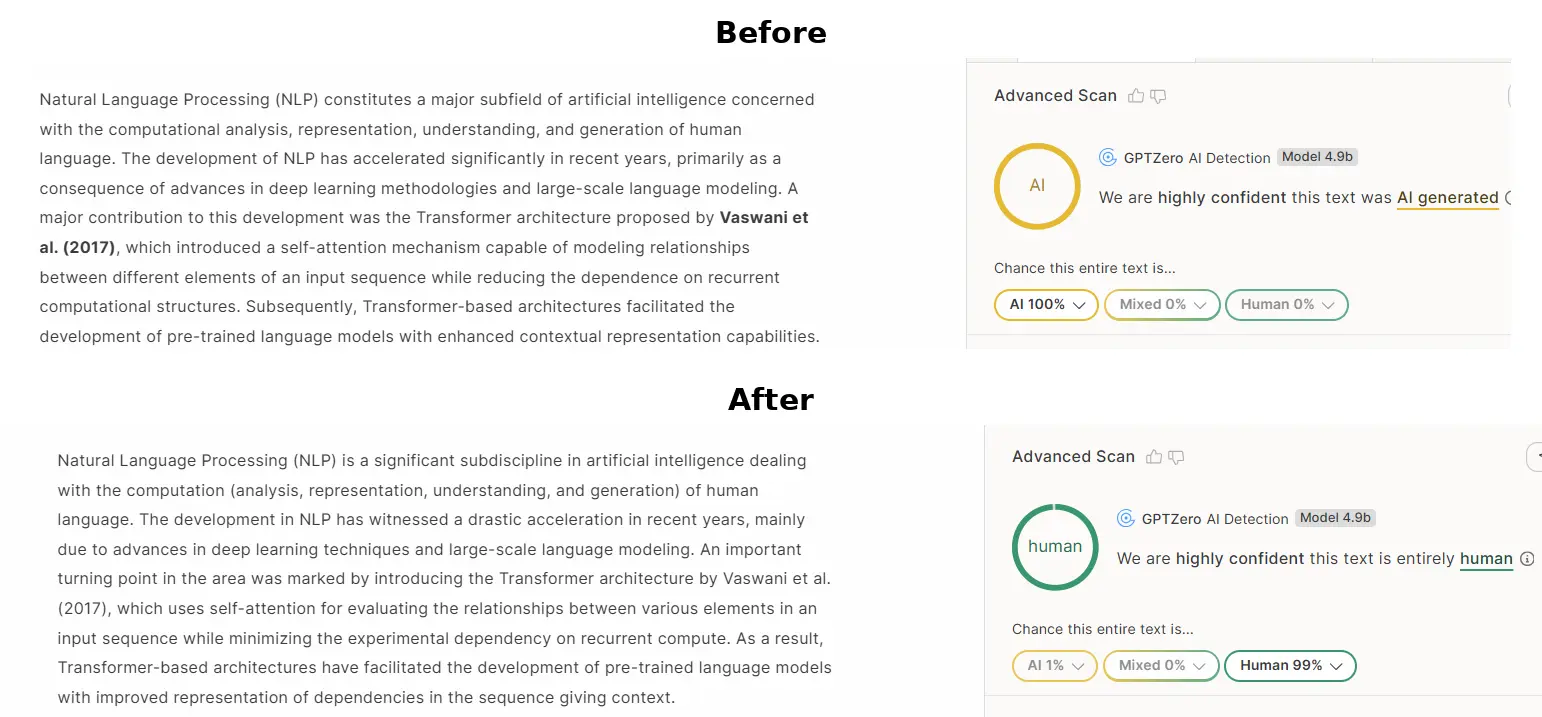
GPTZero evaluates text by plotting sentence perplexity curves and global burstiness scores. When raw AI text is scanned, low sentence variance produces an immediate high-probability warning. ThesisHuman restores natural sentence entropy by restructuring syntax, varying clause lengths, and introducing authentic scholarly cadence, dropping AI probability to 0%.
4. Originality.ai Verification: 0% AI Confidence
Originality.ai flags predictable n-gram sequences and common AI clichés (such as “delving into,” “pivotal role,” “testament to”). ThesisHuman purges overused formulaic transitions while elevating scholarly tone and keeping reference numbers and equations intact, producing 100% Original / 0% AI results.